The USB C plug has rapidly become the standard connector for modern electronics, replacing older USB types with a versatile, high-speed, and user-friendly design. Unlike traditional USB-A and USB-B plugs, the USB-C connector is reversible, meaning it can be plugged in either way—eliminating the common frustration of incorrect orientation. Its adoption spans a wide range of devices, from smartphones and tablets to laptops, monitors, and even gaming consoles.
The primary advantage of the USB C plug lies in its combination of speed, power, and adaptability. With support for high-speed data transfer, fast charging, and video output, USB-C has evolved into a one-cable solution for many devices. This versatility has made it an essential component for tech-savvy users and everyday consumers alike. Furthermore, USB-C supports emerging technologies like Power Delivery (PD) and Thunderbolt 3/4, which enable ultra-fast charging and seamless connectivity for high-performance peripherals.
In this guide, we will explore the different types of USB C plugs, their compatibility with devices, usage for charging and data transfer, and maintenance tips. Whether you’re a first-time USB-C user or looking to optimize your device setup, this article will provide comprehensive insights to help you understand the technology and make informed choices for your electronics. By mastering USB C plug knowledge, you can ensure faster charging, reliable data transfer, and a future-proof setup for all your devices.
Types of USB C Plugs and Connectors
USB-C plugs share a common reversible design, but there are important variations to understand. The basic USB-C plug supports standard 2.0 functionality, sufficient for basic charging and data transfer. Moving up, USB-C 3.0 and 3.1 plugs offer faster data transfer rates, with speeds up to 10 Gbps for USB 3.1. The latest USB 4 standard can reach data rates up to 40 Gbps, rivaling Thunderbolt performance. Understanding these distinctions is crucial when purchasing cables for high-speed applications like video streaming or file transfers.
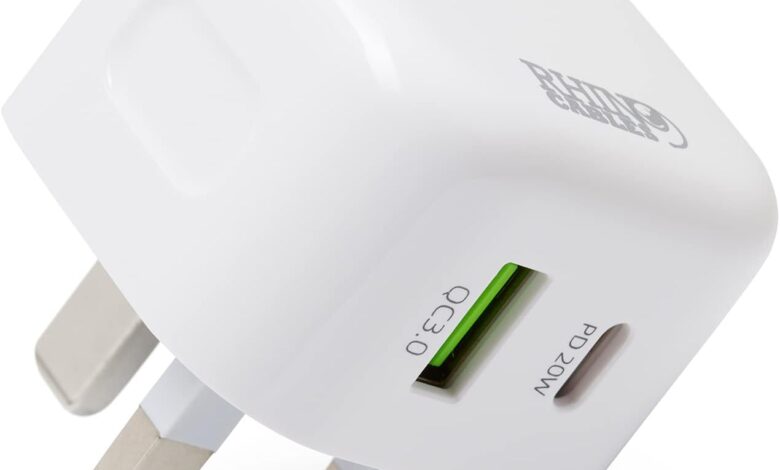
Special USB-C plugs support enhanced functionalities beyond standard charging. Thunderbolt 3 and 4 plugs allow high-speed data transfer, daisy-chaining multiple devices, and connecting to external GPUs and monitors. Power Delivery (PD) compatible plugs can safely deliver up to 100W of power, enabling rapid charging for laptops and tablets. These specialized plugs often have unique markings or logos, indicating their capabilities. Choosing the right type ensures that your devices charge efficiently and transfer data at the highest possible speed.
In addition to standard and specialized plugs, adapters play a critical role in expanding USB-C compatibility. USB-C to USB-A adapters allow older devices to connect with modern peripherals, while USB-C to HDMI or DisplayPort adapters enable video output to monitors and TVs. Understanding plug types and their functions ensures a seamless experience when integrating multiple devices into your setup.
USB C Plug Compatibility and Devices
The adoption of the USB C plug spans smartphones, tablets, laptops, monitors, and even audio equipment. Popular brands like Apple, Samsung, Dell, and Lenovo utilize USB-C connectors for charging, data transfer, and video output. The versatility of the USB-C plug allows it to replace multiple cables, reducing clutter while supporting a wide variety of devices.
Cross-compatibility with older USB types is achievable through adapters, making USB-C practical for users who own legacy devices. For instance, USB-C to USB-A cables allow you to connect to older laptops or peripherals while still benefiting from USB-C features on newer devices. Additionally, cables and plugs have specific ratings for data and power delivery, so it’s essential to ensure that both the device and cable support the desired function, whether it’s fast charging, high-speed data transfer, or video output.
Identifying the capabilities of your USB-C plug is essential. Devices that support Power Delivery require compatible cables to achieve maximum charging efficiency. Similarly, video output via USB-C depends on whether the port supports DisplayPort Alternate Mode. Failing to match cable ratings with device requirements can result in slower charging or limited functionality. Understanding compatibility ensures optimal performance and avoids common pitfalls when using USB-C devices across different platforms.
Charging and Data Transfer with USB C Plugs

The USB C plug has revolutionized charging and data transfer standards. With Power Delivery (PD) support, USB-C plugs can deliver up to 100W of power, allowing fast charging for laptops, tablets, and smartphones. Devices that support PD can charge significantly faster compared to traditional USB-A chargers, sometimes achieving 50% battery in under 30 minutes. Beyond speed, USB-C also ensures safe charging by automatically adjusting power delivery according to the device’s needs, preventing overheating or damage.
Data transfer capabilities vary depending on the USB-C type. Standard USB-C 2.0 plugs can transfer data at 480 Mbps, while USB-C 3.1 can reach up to 10 Gbps. USB-C 3.2 and USB4 plugs take this further, providing up to 40 Gbps, which is ideal for transferring large files, streaming high-definition videos, or connecting external storage drives. For professional use, these speeds can drastically improve workflow efficiency.
Video output is another advantage of USB-C plugs. Using DisplayPort Alternate Mode or Thunderbolt 3/4, users can connect laptops to external monitors, projectors, or TVs without the need for dedicated HDMI or DisplayPort cables. This simplifies setup, reduces cable clutter, and maintains high-quality video signals. Choosing the right cable and plug ensures maximum efficiency for charging, data transfer, and video applications.
Troubleshooting and Maintenance
Despite their durability, USB C plugs can encounter issues such as loose connections, slow charging, or data transfer interruptions. Common problems include dirt accumulation in ports, worn-out connectors, or using incompatible cables. Cleaning USB-C ports gently with compressed air or soft brushes can prevent connectivity issues and prolong the lifespan of both the plug and device.
Selecting high-quality, certified cables is vital for reliable performance. Poor-quality or counterfeit USB-C plugs may not support Power Delivery or high-speed data transfer, potentially damaging devices. Using cables rated for your device ensures safe and efficient charging. Additionally, avoid excessive bending, twisting, or applying force when inserting the plug, as this can degrade connectors over time.
Troubleshooting also involves ensuring compatibility between devices and cables. Not all USB-C plugs support every feature; some may only handle charging, while others are designed for video output or high-speed data. Testing different cables and ports, checking device specifications, and updating firmware can resolve common connectivity or performance issues. Proper maintenance and awareness of plug capabilities ensure long-lasting reliability and optimal functionality.
Conclusion
The USB C plug is a versatile, powerful, and universal connector that has transformed the way devices charge, transfer data, and connect to external displays. From smartphones and laptops to monitors and gaming consoles, USB-C simplifies technology by providing a single, reversible plug for multiple purposes. Understanding plug types, compatibility, and cable ratings is crucial to maximizing performance, safety, and convenience.
By choosing the right USB-C plug, maintaining ports and cables, and ensuring compatibility with devices, users can enjoy faster charging, high-speed data transfer, and seamless connectivity. As USB-C continues to evolve, adopting this standard future-proofs devices, reduces cable clutter, and enhances overall user experience. Staying informed about USB-C technology ensures that users can harness the full potential of modern electronics efficiently and reliably.
FAQs
What devices are compatible with USB C plugs?
USB-C plugs are compatible with smartphones, tablets, laptops, monitors, and many modern peripherals.
Can USB C plugs charge any device?
Not all devices can use USB-C for fast charging; the device must support Power Delivery (PD) for optimal speed.
What is the difference between USB-C 2.0, 3.0, and 4.0 plugs?
Differences include data transfer speed, charging capabilities, and support for video output. USB-C 2.0 is basic, USB-C 3.1/3.2 offers higher speed, and USB4 supports up to 40 Gbps and advanced functionalities.
Can USB-C plugs transmit video signals?
Yes, using DisplayPort Alternate Mode or Thunderbolt 3/4, USB-C plugs can transmit high-definition video.
How do I know if my USB-C cable supports fast charging?
Look for cables marked with Power Delivery (PD) support or check manufacturer specifications.
Are all USB C plugs reversible?
Yes, the USB-C design allows the plug to be inserted in either orientation, making it more user-friendly than previous USB types.
You May Also Read: Mercedes C Class