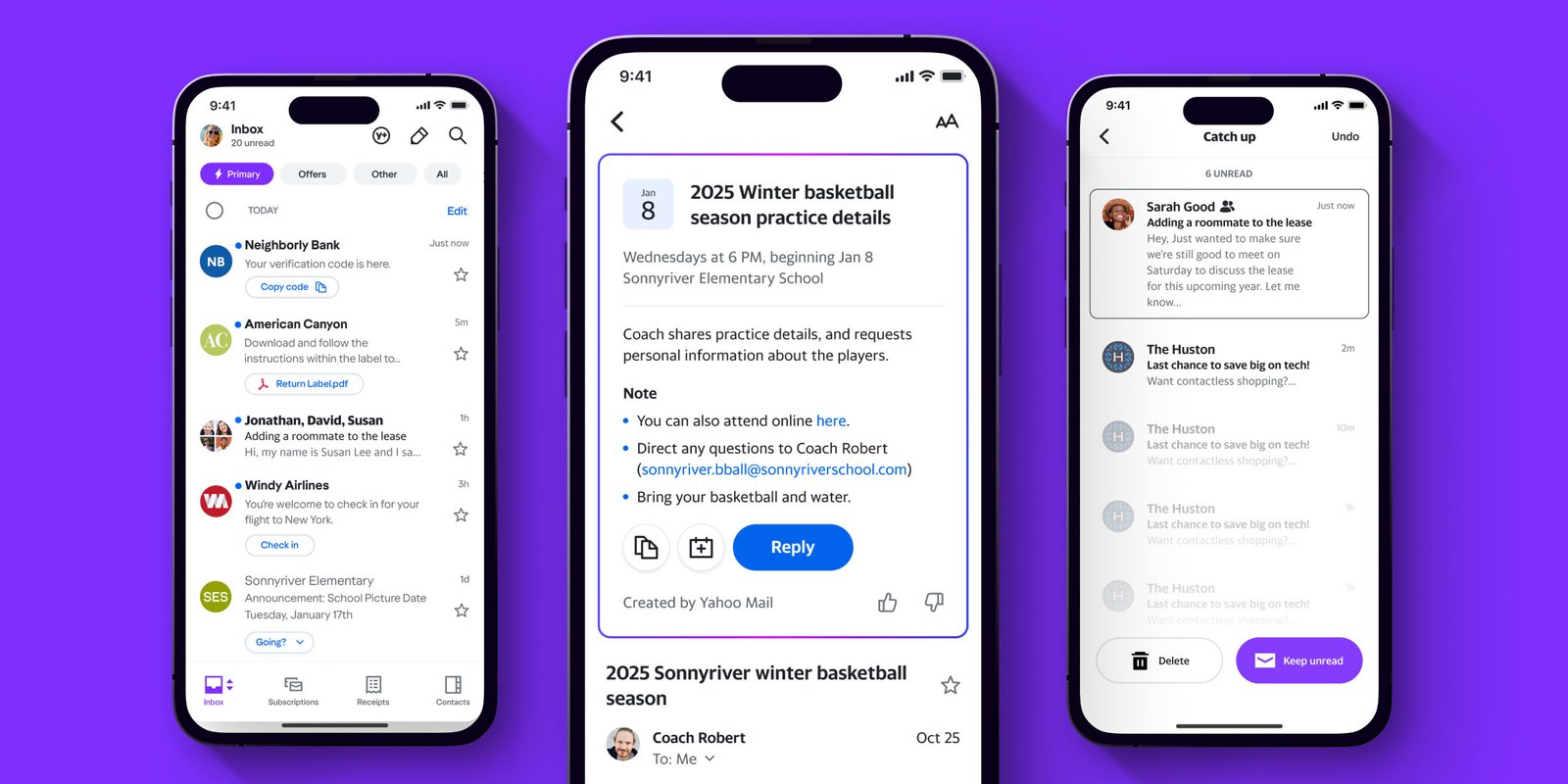
An email inbox used to be little more than a digital mailbox. Today, it is where bills arrive, travel plans live, shopping receipts accumulate, verification codes appear and years of personal correspondence remain archived. Yahoo Mail has evolved alongside that transformation. Rather than competing only on sending and receiving messages, its newest experience emphasizes automatic organization, advanced search, subscription management and AI-assisted tools.
That evolution is especially visible in 2026. Yahoo’s current help documentation describes a redesigned experience with inbox categories, AI-powered message summaries, attachment galleries and easier unsubscribe controls. At the same time, changing storage policies mean longtime users have new reasons to understand how their accounts work.
What Is Yahoo Mail?
Yahoo Mail is Yahoo’s web-based email service, accessible through desktop browsers, mobile web and dedicated smartphone apps. At its core, it provides the familiar functions expected from modern email: sending messages, receiving mail, storing attachments, searching conversations, creating folders and organizing correspondence.
The service increasingly operates as an information-management platform rather than a simple inbox. Yahoo’s current interface can automatically separate important correspondence from promotional material, display attachment previews and provide specialized views for different types of information. Its mobile apps can also bring other supported email accounts into one interface; on iOS, for example, Yahoo says users can add accounts including Gmail and AOL.
That broader approach reflects a major shift in email itself. The challenge for many users is no longer receiving too little information. It is finding the one important message hidden among hundreds of promotions, receipts, alerts and automated notifications.
How Yahoo Mail Has Changed
For longtime internet users, Yahoo Mail represents one of the most recognizable names from the early web era. Yet the modern service bears little resemblance to the simple inboxes of early consumer webmail. Email has become mobile-first, attachment-heavy and deeply connected with ecommerce, subscriptions and online accounts.
Yahoo’s response has increasingly focused on reducing inbox friction. The New Yahoo Mail experience includes a Primary inbox, dedicated categories, starred-message access, advanced search, gallery-style attachment previews and one-click unsubscribe options. AI-generated message summaries can also surface key information without requiring users to work through every line of a long message.
This change is important because modern email services compete as much on organization as on delivery reliability. An inbox containing 20 years of messages is useful only if its owner can quickly find what matters.
The New Yahoo Mail Inbox Explained
The redesigned Yahoo Mail experience automatically organizes messages into several categories. Yahoo currently identifies All, Primary, Offers, Social and Newsletters as the principal inbox categories. Primary is intended for personal and time-sensitive messages, including bills, orders and other important correspondence.
Users do not lose access to messages when categories are enabled. The All view continues to display everything in the inbox, while the other tabs create more focused collections. Users can also choose whether Primary or All becomes their default inbox view.
This design addresses one of email’s most persistent problems: promotional volume can overwhelm personally important correspondence. Instead of forcing users to build a complex folder system manually, automatic categorization attempts to separate different types of messages as they arrive.
However, automated classification should not replace occasional inbox checks. Important messages can sometimes appear somewhere unexpected, so users waiting for critical correspondence should search by sender or subject if it does not appear in the anticipated category.
AI Is Becoming Part of the Email Experience
One of the most significant recent developments is the integration of artificial intelligence. Yahoo Mail now offers AI-powered message summaries in its newer experience. Rather than displaying only a subject line and preview, summaries attempt to highlight the important information contained within a message.
On iOS, Yahoo says its AI features can identify information such as event dates and times, travel confirmation details, billing information and verification codes. Quick actions can then help users perform relevant tasks, such as adding an event to a calendar, copying information or managing a booking.
The mobile app also offers AI Compose. Yahoo currently lists five tone options: Improve, Concise, Friendly, Professional and Add Emojis. These tools illustrate where consumer email is heading—toward interfaces that not only store messages but also interpret them and help users act on their contents.
AI-generated summaries should nevertheless be treated as conveniences rather than substitutes for reading sensitive or legally important correspondence. For financial, contractual, medical or other consequential messages, users should still review the original email.
Yahoo Mail Storage Has Changed
Storage is one of the most important recent developments for Yahoo Mail users. Yahoo’s current U.S. help documentation states that free accounts now include 20 GB of storage. Paid storage options include 100 GB and 1 TB plans, while Yahoo Mail Plus includes 200 GB. Yahoo says Mail Plus can be combined with another storage plan for up to 1.2 TB total.
This is particularly relevant to longtime account holders with large archives. Yahoo notes that storage amounts and plans can vary outside the United States, so users should check the storage information displayed within their own account rather than assuming the U.S. limits apply globally.
If an account reaches its storage limit, Yahoo says the user will need to reduce usage to resume normal operation. While full, the mailbox cannot send or receive new messages, and incoming emails during that period are not stored for later recovery.
That makes storage management more than a housekeeping exercise. For people who use email for work, bills or account recovery, maintaining free space can prevent important messages from being missed.
Finding Emails Faster With Search and Views
A modern inbox can contain thousands—or even tens of thousands—of messages. Consequently, search quality can matter more than manually filing every email into a perfect folder structure.
The New Yahoo Mail provides advanced search filters that can narrow results by sender, recipient, subject, date or date range. Users can also search for messages containing attachments, photographs or calendar invitations and restrict searches to particular mailboxes.
Yahoo also offers specialized Views. These can group related information into categories such as Contacts, Photos, Documents, Subscriptions, Shopping, Receipts and Travel.
This can be especially practical when the user remembers what an email contained but not who sent it. Someone searching for an old flight booking, for example, may find a Travel view more intuitive than trying multiple keywords. Likewise, Photos and Documents can reduce the time spent opening individual messages just to find an attachment.
Managing Newsletters and Inbox Clutter
Email subscriptions can accumulate almost invisibly. A discount code, competition entry or online purchase may place an address onto a mailing list, and over several years those lists can turn an otherwise useful inbox into a stream of promotions.
Yahoo Mail addresses this problem through unsubscribe tools. In New Yahoo Mail, an unsubscribe option can appear at the top of eligible messages, allowing users to leave mailing lists without searching through tiny footer links. Yahoo’s smart features also include a Subscriptions view designed to centralize list-mail management.
Yahoo has also introduced a Catch up feature in its app. It provides an AI-generated summary and simple Keep or Delete controls so users can process unread messages more quickly.
A practical inbox-cleaning strategy is to start with recurring newsletters rather than deleting messages individually. Removing unwanted future mail reduces clutter permanently, while mass deletion alone only treats the existing backlog.
How Yahoo Mail Handles Spam and Phishing
Security remains fundamental because email accounts frequently function as gateways to other online services. Password resets, verification links, financial alerts and personal conversations can all pass through a single address.
Yahoo says its spam filters attempt to detect spam, malware and phishing, although unwanted messages can still occasionally reach the inbox. When that happens, marking a message as spam helps the system identify future mail from that sender and route it appropriately.
Yahoo also provides phishing and reply-to alerts in certain circumstances. Its security documentation says users can be warned when a sending address appears suspicious or when replies are configured to go somewhere unexpected.
On Android, Yahoo describes using BIMI—Brand Indicators for Message Identification—to help identify participating verified brands through logos and says the app can warn users when an email appears spoofed.
No automated filter is perfect. Users should remain cautious about unexpected password requests, attachments, payment demands and messages creating artificial urgency.
Practical Ways to Secure a Yahoo Account
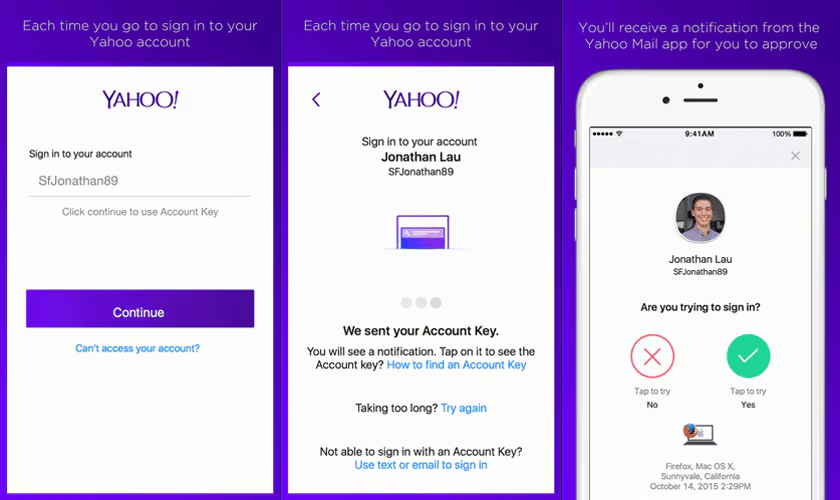
The first layer of account protection is a strong, unique password that is not reused on other websites. Password reuse is particularly dangerous because a breach at an unrelated service can expose credentials that attackers then try against email providers.
Users should also keep account-recovery information current and pay attention to unfamiliar security activity. A compromised email account can have consequences beyond the inbox because attackers may attempt password resets for shopping, social media and financial accounts connected to that address.
Inside Yahoo Mail, suspicious messages should be reported rather than answered. Yahoo specifically advises users not to reply to unknown senders and to be cautious about where they provide their email addresses. It also warns against services claiming to remove addresses from spam lists because some can function as address collectors.
For particularly sensitive links, users can independently navigate to the organisation’s known website instead of clicking through an unexpected email.
Using Yahoo Mail on Mobile Devices
Smartphones have changed email behaviour fundamentally. People now check messages while travelling, shopping, commuting or waiting for appointments rather than sitting exclusively at a desktop computer.
The Yahoo Mail app reflects this shift with mobile-specific organization and quick actions. On iOS, Yahoo says users can add multiple email accounts, browse unread or starred messages, view attachments and use AI-assisted features from the app.
Quick actions are particularly notable. Yahoo’s iOS documentation lists actions for bills, orders, hotel bookings, event RSVPs, calendar invitations, verification codes and flight itineraries.
The Android experience similarly includes inbox filters and specialized shopping and receipt features. Yahoo says users can review purchases and track packages through the app’s organized views.
These features reveal a broader trend: email apps increasingly behave like personal information dashboards instead of chronological message lists.
Free Yahoo Mail vs Yahoo Mail Plus
The free service remains suitable for many everyday users, but Yahoo also offers a premium subscription called Yahoo Mail Plus. The paid version removes inbox advertising and adds additional features.
According to Yahoo’s current documentation, Mail Plus includes an ad-free experience, auto-forwarding, domain blocking, disposable email addresses and other premium controls. Yahoo also states that active Mail Plus subscribers receive protection against email deletion caused by long periods of account inactivity.
Mail Plus currently includes 200 GB of storage in the U.S. storage structure, although availability and product details can vary by location.
Whether upgrading makes sense depends on usage. Someone with a modest mailbox may need little beyond the free service, whereas users maintaining large archives or wanting an ad-free experience and premium controls may find the paid tier more relevant.
How to Organize Yahoo Mail More Efficiently
Good email management starts with reducing unnecessary incoming mail. Unsubscribe from newsletters that no longer provide value, report genuine spam and use automatic categories to separate promotional content from important correspondence.
Next, rely on search and specialized views instead of creating an excessive number of folders. Yahoo’s Receipts, Travel, Documents and Photos views can make certain information easier to retrieve, while advanced search handles more specific queries.
Users can also take advantage of conversation grouping. New Yahoo Mail groups replies into threads by default, reducing clutter and keeping related correspondence together. Yahoo allows this behaviour to be switched off in Settings for people who prefer every message displayed separately.
Finally, review storage periodically. Large attachments and old messages can quietly consume capacity, and reaching the limit can interrupt both sending and receiving.
The Future of Yahoo Mail and AI-Powered Email
The next phase of email appears likely to focus less on displaying messages and more on understanding them. AI summaries, automated categorization and quick actions already show this transition inside Yahoo Mail.
The emerging model is an inbox that can recognize that one message contains a bill, another contains a flight booking and another is an advertising newsletter—and then present each differently. Yahoo’s current features already move in this direction through Primary categorization, specialized views, AI summaries and mobile quick actions.
Future email tools may become even more proactive, helping users identify deadlines, prioritize conversations and reduce repetitive administrative work. However, the central challenge will remain trust. Automated systems must organize information without causing users to overlook critical details.
For that reason, human review will continue to matter even as AI becomes more capable. The best future inbox may not be the one that automates everything, but the one that saves time while keeping users firmly in control.
Key Takeaways
Yahoo Mail in 2026 is increasingly focused on intelligent inbox management rather than basic message delivery alone. New Yahoo Mail offers Primary, Offers, Social and Newsletters categories alongside the All view, while advanced search, attachment previews and one-click unsubscribe tools help users handle large inboxes more efficiently.
AI-powered message summaries and mobile quick actions can highlight information from bills, orders, events and travel messages. Users can also turn AI message summaries off through settings if they prefer not to use them.
Storage deserves particular attention. Yahoo’s current U.S. documentation lists 20 GB for free accounts, with larger paid plans available. Accounts that exceed their limit can lose the ability to send and receive new email until space is freed or storage is upgraded.
Conclusion
Yahoo Mail has survived several generations of internet change because email itself remains essential. What has changed is the problem users need their inbox to solve. Receiving messages is easy; finding important information among years of promotions, attachments, receipts and notifications is considerably harder.
Yahoo’s current direction addresses that challenge with automatic categories, AI summaries, advanced search, specialized views and easier subscription management. At the same time, security awareness and storage management remain essential responsibilities for users.
Anyone returning to an old Yahoo account or using the service daily should review the new inbox settings, check current storage usage, update account-security information and explore the organization tools now available. A few minutes spent configuring the inbox can make years of accumulated email significantly easier to manage.
FAQs
Is Yahoo Mail still available?
Yes. Yahoo continues to operate and update its email service across web and mobile platforms.
How much free storage does Yahoo Mail offer?
Yahoo currently lists 20 GB for free accounts in the United States. Limits may differ by region.
Does Yahoo Mail use AI?
Yes. Current features include AI-generated message summaries and AI-assisted tools on supported platforms.
Can Yahoo Mail organize emails automatically?
Yes. New Yahoo Mail can categorize messages into Primary, Offers, Social and Newsletters.
Can I turn off Yahoo Mail AI summaries?
Yes. Yahoo provides a toggle for message summaries under AI features in the new desktop experience.
You May Also Read: Royal Mail Tracking